Containerization Best Practices: A 7-Step Deployment Checklist for US DevOps Teams in 2026
In the rapidly evolving landscape of software development, containerization has emerged as a cornerstone technology, fundamentally transforming how applications are built, deployed, and managed. For US DevOps teams, embracing Containerization Best Practices is not just an advantage; it’s a necessity for maintaining competitive edge, ensuring operational efficiency, and driving innovation. As we look towards 2026, the complexity of distributed systems, the demand for rapid iteration, and the imperative for robust security make a well-defined container strategy paramount. This comprehensive guide outlines a 7-step deployment checklist, offering practical solutions to navigate the intricacies of containerization and unlock its full potential.
The promise of containers lies in their ability to package an application and all its dependencies into a single, isolated unit. This ensures consistency across different environments, from development to production, effectively eliminating the infamous "it works on my machine" problem. However, merely adopting containers is not enough. True value is derived from implementing Containerization Best Practices that address scalability, security, automation, and lifecycle management. Without these practices, the benefits can quickly turn into operational overhead and security vulnerabilities.
This article aims to equip US DevOps teams with a pragmatic framework. We will delve into each step of the deployment checklist, providing actionable insights and highlighting key considerations. From initial image optimization to advanced orchestration and monitoring, our goal is to empower your team to build resilient, high-performing, and secure containerized applications that stand the test of time and technological advancement.
The Imperative of Containerization in 2026 for US DevOps Teams
The digital transformation journey for many US enterprises is intrinsically linked to their adoption of cloud-native architectures, with containers at the core. The agility, portability, and resource efficiency offered by containers are unmatched. In 2026, with hybrid and multi-cloud strategies becoming the norm, and the increasing demand for instant scalability and resilience, a mature containerization strategy is non-negotiable. DevOps teams are on the front lines of this transformation, tasked with implementing solutions that are both innovative and robust.
The challenges are significant: managing a sprawling ecosystem of microservices, ensuring stringent security and compliance, optimizing resource utilization, and maintaining observability across complex distributed systems. This is where a clear set of Containerization Best Practices becomes invaluable. It provides a roadmap for consistent, repeatable, and secure deployments. Ignoring these best practices can lead to ‘container sprawl’, security breaches, performance bottlenecks, and increased operational costs, effectively undermining the very benefits containers are meant to deliver.
Moreover, the talent landscape in the US is increasingly demanding expertise in container technologies like Docker and Kubernetes. Teams that master these tools and integrate them with sound practices will be better positioned to attract and retain top talent, fostering a culture of innovation and continuous improvement. This checklist serves as a foundational guide for both seasoned DevOps professionals and newcomers, ensuring a standardized approach to container deployment that aligns with future industry trends and compliance requirements.
7-Step Deployment Checklist for Containerization Best Practices
Step 1: Image Optimization and Standardization
The journey to robust containerization begins with highly optimized and standardized container images. An inefficient image can lead to bloated deployments, longer build times, increased attack surfaces, and higher resource consumption. Adhering to Containerization Best Practices in this initial phase sets the stage for success.
1.1 Use Minimal Base Images
Start with the smallest possible base image. Alpine Linux is a popular choice due to its tiny footprint, which significantly reduces image size and potential vulnerabilities. Avoid using full-featured OS images unless absolutely necessary, as they introduce unnecessary layers and dependencies.
1.2 Multi-Stage Builds
Leverage multi-stage builds in your Dockerfiles. This powerful feature allows you to use multiple FROM statements, discarding build-time dependencies and artifacts in the final image. The result is a leaner, more secure production image containing only what’s essential for the application to run.
# Example of a multi-stage Dockerfile

FROM node:16-alpine AS builder
WORKDIR /app
COPY package*.json ./
RUN npm install
COPY . .
RUN npm run build

FROM node:16-alpine
WORKDIR /app
COPY --from=builder /app/dist ./dist
COPY --from=builder /app/node_modules ./node_modules
COPY --from=builder /app/package*.json ./
CMD ["node", "dist/main.js"]
1.3 Layer Caching Strategy
Organize your Dockerfile instructions to take advantage of layer caching. Place instructions that change infrequently (like dependency installations) higher up, and those that change often (like application code) lower down. This significantly speeds up build times for subsequent image builds.
1.4 Avoid Root Privileges
Run containers as non-root users whenever possible. This is a critical security best practice. Add a dedicated user and group within your Dockerfile and switch to that user before running your application. This minimizes the impact of a potential container breakout.
1.5 Scan Images for Vulnerabilities
Integrate image scanning tools (e.g., Clair, Trivy, Docker Scout) into your CI/CD pipeline. Regularly scan your images for known vulnerabilities and ensure that only images meeting predefined security thresholds are deployed. This is a non-negotiable aspect of modern Containerization Best Practices.
Step 2: Robust Container Security
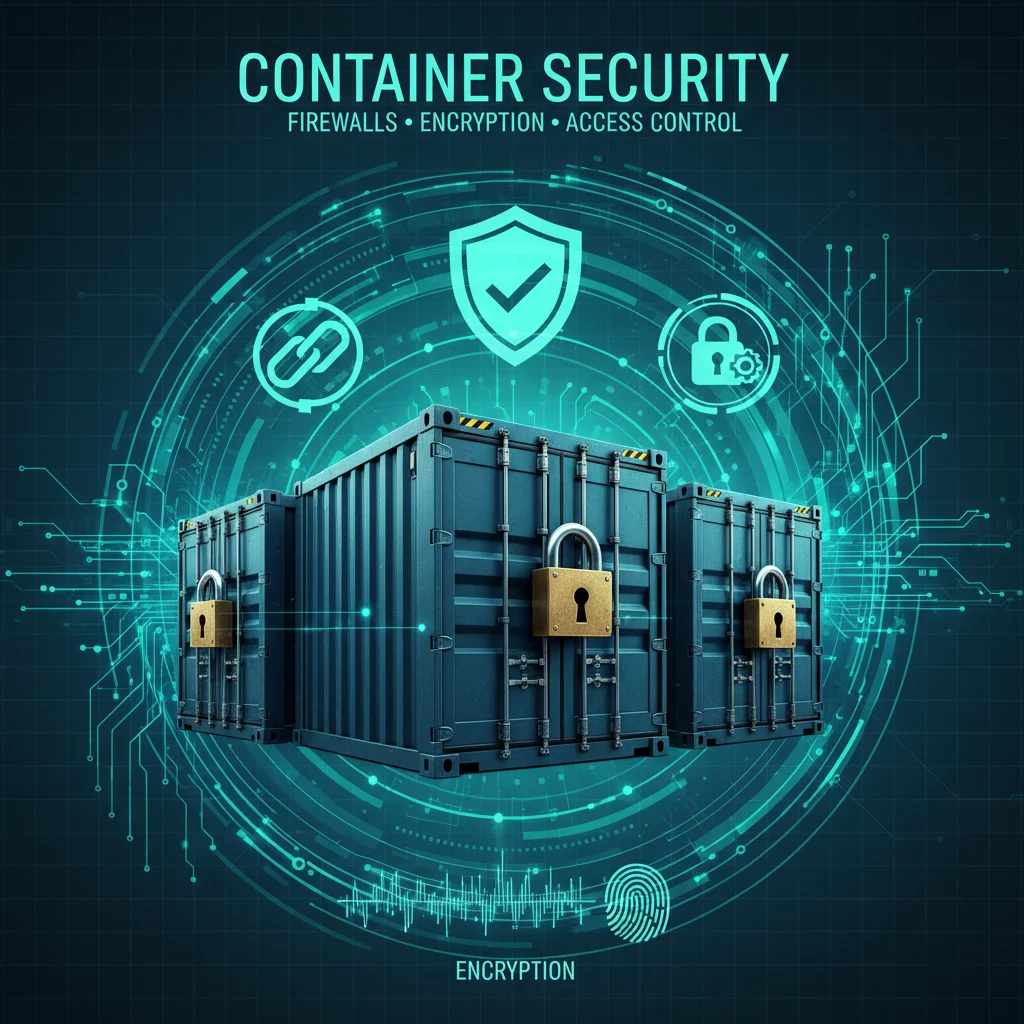
Security is not an afterthought in containerization; it must be ingrained into every stage of the lifecycle. Neglecting container security can lead to devastating breaches. US DevOps teams must adopt a multi-layered approach to protect their containerized applications.
2.1 Principle of Least Privilege
Beyond running as non-root, ensure that containers only have the minimum necessary permissions to perform their function. Limit access to host resources, network capabilities, and sensitive data. Utilize Kubernetes RBAC (Role-Based Access Control) to restrict what containers and users can do within the cluster.
2.2 Network Segmentation and Policies
Implement network segmentation to isolate containers and microservices. Use network policies (e.g., Kubernetes NetworkPolicies) to control traffic flow between pods and external services. This prevents lateral movement in case of a breach and limits the blast radius.
2.3 Secret Management
Never hardcode sensitive information (API keys, database credentials) into container images or configuration files. Use dedicated secret management solutions like Kubernetes Secrets, HashiCorp Vault, AWS Secrets Manager, or Azure Key Vault. Ensure secrets are encrypted at rest and in transit.
2.4 Runtime Security Monitoring
Deploy runtime security tools that monitor container behavior for anomalous activities. Solutions like Falco can detect unauthorized process execution, file system changes, or network connections, providing real-time alerts and enabling rapid response to threats.
2.5 Regular Updates and Patching
Keep your base images, application dependencies, container runtime, and orchestration platform (Kubernetes) up-to-date. Regular patching addresses known vulnerabilities and ensures you benefit from the latest security enhancements. Automate this process where possible to reduce manual overhead.
Step 3: Orchestration with Kubernetes
For US DevOps teams, Kubernetes has become the de facto standard for container orchestration. Mastering Kubernetes is central to implementing effective Containerization Best Practices at scale. It offers powerful capabilities for deployment, scaling, and management of containerized applications.
3.1 Declarative Configuration
Embrace declarative configurations using YAML files for all Kubernetes resources (Deployments, Services, Ingress, ConfigMaps, Secrets, etc.). This allows for version control, easier auditing, and reproducible deployments. Tools like Kustomize or Helm can help manage complex configurations.
3.2 High Availability and Redundancy
Design your deployments for high availability. Use multiple replicas for your application pods, distribute them across different nodes and availability zones, and configure anti-affinity rules to prevent co-location. Implement readiness and liveness probes to ensure your application instances are healthy and responsive.
3.3 Resource Management
Define resource requests and limits for your containers (CPU and memory). This is crucial for efficient resource utilization, preventing noisy neighbor issues, and ensuring stable performance. Accurate resource requests help the Kubernetes scheduler place pods effectively, while limits prevent a single container from monopolizing cluster resources.
3.4 Scalability and Auto-scaling
Configure Horizontal Pod Autoscalers (HPA) and Cluster Autoscalers. HPA automatically scales the number of pods based on metrics like CPU utilization or custom metrics. Cluster Autoscaler adjusts the number of nodes in your cluster to match your workload demands, optimizing costs and performance.
3.5 Service Discovery and Load Balancing
Leverage Kubernetes Services for internal service discovery and load balancing. For external access, use Ingress controllers or Load Balancers to expose your applications securely and efficiently. This abstracts away network complexities and allows for seamless communication between microservices.
Step 4: CI/CD Pipeline Automation
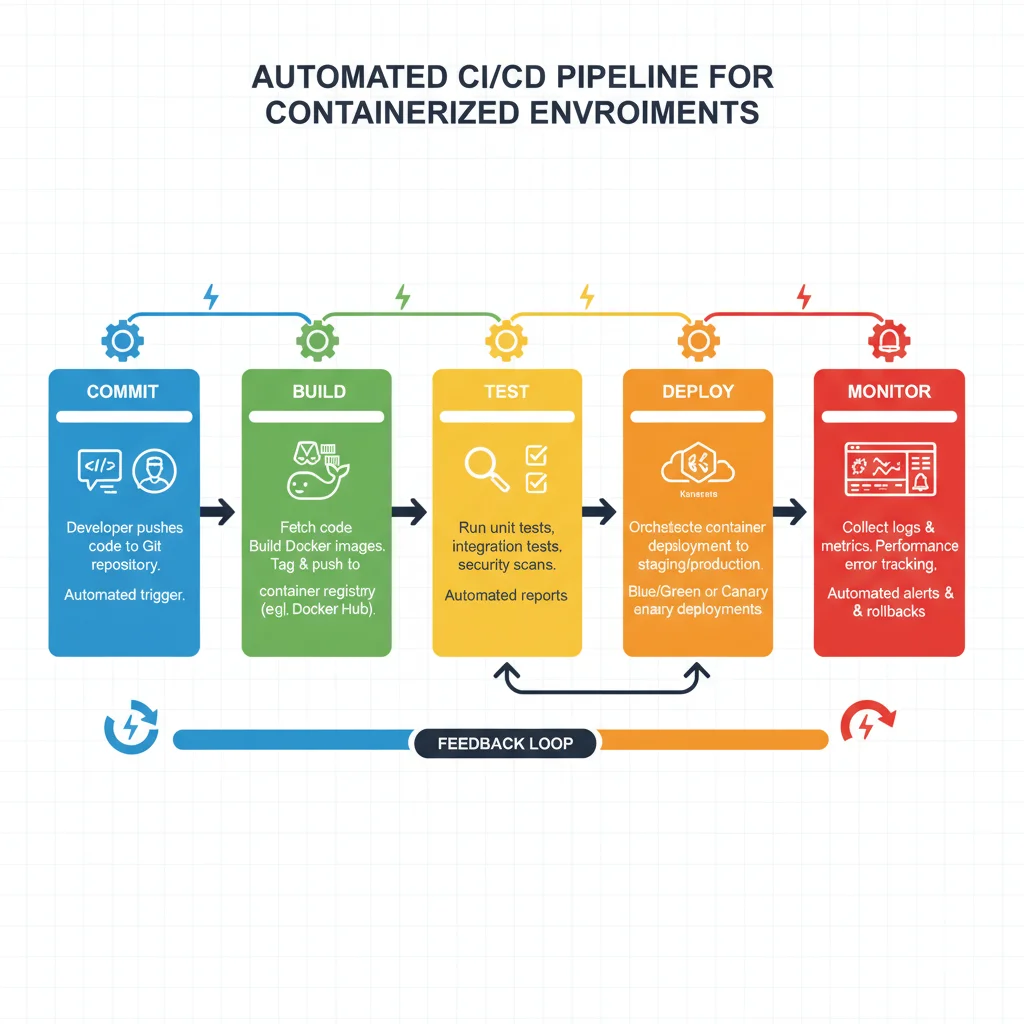
Automation is the heartbeat of DevOps, and nowhere is it more critical than in the context of containerized deployments. A robust Continuous Integration/Continuous Delivery (CI/CD) pipeline is essential for implementing Containerization Best Practices, enabling rapid, reliable, and consistent software delivery.
4.1 Automated Builds and Tests
Automate the entire build process, from code commit to image creation. Integrate unit, integration, and end-to-end tests into your CI pipeline to catch bugs early. Ensure that container images are built consistently from your source code repository, and that only tested images proceed to deployment.
4.2 Immutable Infrastructure Principles
Embrace immutable infrastructure. Once a container image is built, it should not be modified. Any changes should trigger a new image build and redeployment. This ensures consistency and simplifies rollbacks. Your CI/CD should facilitate this by creating new images for every change.
4.3 Automated Deployments
Automate the deployment of containers to your Kubernetes clusters. Tools like Argo CD or Flux CD (GitOps tools) can synchronize your cluster state with your Git repository, ensuring that your infrastructure and application configurations are always aligned with your desired state. This minimizes human error and speeds up deployments.
4.4 Rollback Capabilities
Design your deployment process with easy rollback mechanisms. Kubernetes deployments inherently support rollbacks, but your CI/CD pipeline should make it straightforward to revert to a previous stable version of your application in case of issues. This is a crucial safety net for any production environment.
4.5 Integration with Artifact Repositories
Use a centralized artifact repository (e.g., Docker Hub, Google Container Registry, AWS ECR, Azure Container Registry) to store your container images. Your CI pipeline should push new images to this repository, and your CD pipeline should pull from it. This ensures a single source of truth for your images.
Step 5: Monitoring and Logging
Visibility into your containerized applications and infrastructure is paramount for identifying issues, optimizing performance, and ensuring operational health. Effective monitoring and logging are foundational Containerization Best Practices.
5.1 Centralized Logging
Implement a centralized logging solution (e.g., ELK Stack – Elasticsearch, Logstash, Kibana; Grafana Loki; Splunk). Containers are ephemeral, so logs must be collected from within the container and shipped to a central store. This allows for easier debugging, auditing, and trend analysis across your distributed systems.
5.2 Comprehensive Monitoring
Monitor key metrics at multiple levels: host, cluster, and application. Use tools like Prometheus and Grafana for collecting and visualizing metrics. Track CPU, memory, network I/O, disk I/O, and application-specific metrics. Set up alerts for critical thresholds to proactively identify and address problems.
5.3 Tracing and Observability
For microservices architectures, distributed tracing (e.g., Jaeger, Zipkin, OpenTelemetry) is essential. It allows you to track requests as they flow through multiple services, providing insights into latency, errors, and performance bottlenecks across your entire application stack. This enhances your ability to troubleshoot complex issues.
5.4 Health Checks and Probes
Configure Kubernetes liveness and readiness probes correctly. Liveness probes detect if an application is running and can restart containers that become unresponsive. Readiness probes determine if a container is ready to serve traffic, preventing requests from being routed to unhealthy instances. These are fundamental to maintaining application availability.
5.5 Performance Benchmarking
Regularly benchmark your containerized applications under various load conditions. This helps identify performance bottlenecks, optimize resource allocation, and ensure your applications can handle anticipated traffic. Performance testing should be an integral part of your CI/CD pipeline.
Step 6: Resource Management and Cost Optimization
While containers offer efficiency, managing resources and optimizing costs in a dynamic, containerized environment requires deliberate effort. Implementing smart resource management is a key aspect of Containerization Best Practices for US DevOps teams.
6.1 Right-Sizing Containers
Accurately determine the CPU and memory requirements for your applications. Over-provisioning leads to wasted resources and higher costs, while under-provisioning can cause performance issues and instability. Use historical usage data and performance testing to right-size your containers.
6.2 Cluster Optimization
Optimize your Kubernetes cluster configuration. This includes choosing appropriate instance types for your nodes, utilizing spot instances for fault-tolerant workloads, and leveraging cluster autoscaling. Regularly review cluster utilization to identify idle resources that can be scaled down or deprovisioned.
6.3 Cost Visibility and Allocation
Implement tools and processes for cost visibility. Understand which applications and teams are consuming which resources. Use Kubernetes labels and namespaces to tag resources for cost allocation and chargeback purposes. Cloud provider tools (e.g., AWS Cost Explorer, Azure Cost Management) can help track container-related expenses.
6.4 Efficient Storage Management
Choose the right storage solutions for your containerized applications. For stateless applications, ephemeral storage is sufficient. For stateful applications, use persistent volumes (e.g., AWS EBS, Azure Disk, Google Persistent Disk) and consider managed services like cloud-native databases or object storage to reduce operational overhead.
6.5 Garbage Collection and Cleanup
Regularly clean up unused images, volumes, and terminated containers. Left unchecked, these can consume significant disk space and lead to increased costs. Implement automated cleanup scripts or use tools that manage container lifecycles effectively.
Step 7: Disaster Recovery and Business Continuity
Even the most robust systems can experience failures. A comprehensive disaster recovery (DR) and business continuity (BC) plan is an indispensable part of Containerization Best Practices, ensuring your applications remain available and data is protected in the face of outages.
7.1 Backup and Restore Strategy
Implement a clear backup strategy for your persistent data. For Kubernetes, this involves backing up persistent volumes and critical cluster configurations. Tools like Velero can facilitate backing up and restoring Kubernetes cluster resources and persistent volumes across different clusters or cloud providers.
7.2 Multi-Region/Multi-Cloud Deployments
For critical applications, consider deploying across multiple regions or even multiple cloud providers. This provides resilience against regional outages and offers greater fault tolerance. Ensure your application architecture supports active-active or active-passive configurations across these environments.
7.3 Regular DR Drills
Regularly test your disaster recovery plan. Conduct periodic DR drills to simulate various failure scenarios (e.g., region outage, data corruption, critical service failure). This helps identify weaknesses in your plan and ensures your team is prepared to respond effectively when a real disaster strikes.
7.4 Immutable Backups
Store backups in immutable storage where possible to protect against accidental deletion or ransomware attacks. This adds an extra layer of security and ensures the integrity of your recovery points.
7.5 Documentation and Runbooks
Maintain thorough documentation for your containerized applications, infrastructure, and disaster recovery procedures. Create detailed runbooks for common operational tasks and emergency response scenarios. This ensures that knowledge is shared and that your team can confidently execute recovery plans.
Future Trends and Continuous Improvement in Containerization
The field of containerization is constantly evolving. For US DevOps teams, staying abreast of emerging trends and committing to continuous improvement is vital. Adopting Containerization Best Practices is not a one-time effort but an ongoing journey.
Service Mesh Adoption
The rise of service meshes like Istio, Linkerd, and Consul Connect is transforming how microservices communicate. They provide advanced traffic management, security, and observability capabilities at the network layer, offloading these concerns from application code. Integrating a service mesh can significantly enhance your containerization strategy, especially for complex microservices architectures.
WebAssembly (Wasm) in Containers
While still nascent, WebAssembly (Wasm) is gaining traction as a potential runtime for server-side applications, offering extremely lightweight and secure execution environments. As Wasm runtimes mature, we may see a shift towards combining the benefits of Wasm with container orchestration, leading to even more efficient and secure deployments.
AI/ML Integration for Operations (AIOps)
Leveraging AI and Machine Learning for operational insights (AIOps) will become increasingly important. ML Platforms can analyze vast amounts of monitoring and logging data from containerized environments to detect anomalies, predict outages, and automate remediation, further enhancing the efficiency and reliability of your DevOps pipelines.
Enhanced Security with Supply Chain Protection
The focus on software supply chain security will intensify. Expect more robust tools and processes for ensuring the integrity of every component, from source code to deployed container. This includes digital signing of images, SBOM (Software Bill of Materials) generation, and stricter policies for dependency management.
Edge Computing and IoT
Containerization is expanding beyond traditional data centers and clouds to edge environments and IoT devices. Deploying and managing applications at the edge using lightweight container runtimes and orchestration tools like K3s will become a significant area of growth, presenting new challenges and opportunities for Containerization Best Practices.
Conclusion
Embracing Containerization Best Practices is a strategic imperative for US DevOps teams aiming for future-proof, efficient, and secure software delivery in 2026 and beyond. This 7-step deployment checklist provides a robust framework, guiding teams through the critical stages of image optimization, security implementation, effective orchestration, automation, monitoring, resource management, and disaster recovery.
The landscape of container technology is dynamic, but the core principles of reliability, security, and efficiency remain constant. By meticulously following this checklist and fostering a culture of continuous learning and adaptation, your team can harness the full power of containerization. This will not only streamline your development and operations but also drive innovation, enhance application performance, and significantly reduce operational risks. The future of software delivery is containerized, and with these best practices, your organization will be well-equipped to lead the way.